Wednesday, 10 February 2010

UPDATE Changes and Compositing

Afteer the opportunity fell through for me to use my own character and rig, i felt i neeeded to try something new to get the animation part of the project finished in time for the deadline. I decided to use a pre rigged charadcter called Bork, which on one level saddened me, and i felt i was somewhat 'cheating' as i was really looking forward to using my own character, however it also had its positives. I was able to get the full use of a professional rig, and that meant great deals of scope to have an improved animation. It meant that i may have been safrificing my modelling but i was gaining alot in what i could do in terms of animation which did not get me down too much.


Tracking my scene


I used maya live to track my scene. I found the tutorial we were given to do this fairly easy to use, and i dindt have many problems with it until i came to solving my scene. I found out nthat i had set my scene up incorrectly in the first place, as i had uploaded all the image files in my scene rather than just the ones i needed to track, which gave me a massive pixel slip of something around 17, rather than the number under 2 that i was looking for. However i quickly learned from this error, and i used only the image files needed in tracking, and got a far greater result with a pixel slip of something around 0.8 which i went on to use for solving my tracking data. I created my cameraa with the data i had collected, and then went on to import my character that i was using for the animation. i put him inbetween camera and plane, and began to animate. I found it quite hard doing this so i decided to move the character away from the plane to animate out of the way of all of the distractions, and moved him back into place, switching from perspective view to my camera to see whether the animation aligned as i wanted it to.

It is a shame i wasnt able to use my washing machine character instead of a pre rigged character in this process, as i feel it would have looked a lot better.


Setting up my scene.


Camera tracking data created after it solved.


The camera newly created in perspective view


Character imported into camera view, ready to animate.


Modelling and rigging my character

Modelling and rigging my character

Here are the stages i went through in modelling and rigging the character i had designed. The design concept first came around when i was thinking about the first scene i chose, the tracking chase scene in the jungle which i had difficulties tracking. The noise the 'monster' makes in Lost, is a rattling, and mechanical sound which sounds very out of place within a jungle, so i thought i would put a twist on it when com,ing up for the design of my character and have him as a washing machine so that it would some way fit the sounds that are already in the live action. However now that i have scrapped that scene, i think i will still be abel to use my character, as he couyld just look like an inconspicuous piece of debris walking across the scene after the plane crash. I think this would put a funny twist on the actual serious nature of the drama which is occuring in the episode.

Is tarted out with a few sketches of a washing machine and then went on to use them to model a character in Maya. I wanted him to look cartoon-like whilst still having a somewhat human feel, so i gave him arms and legs. And to add a comedy aspect to the character, i gave him random flip flops, as he is on a beach, and maybe there to go swimming?

I want to put accross the character not as being evil, but as being quite a funny character, and the chase scene may have done the opposite for that, giving the character a position of heirachal power and frightening the lives out fo the characters running from it on screen. This new scene i have found has given me a lot of potential to create an opposite effect, and allowing the character to be portrayed very differently. My character first come from my imagination, and i feel from there it is important to develop a character persona, this is important in establishing a connection between it and the audience, and the way he is viewed by them. Colour and appeareance can play a pivotal role in this, i have chosen bright soft colours to emphasise its friendly nature, although the bright yellow flip flops give it a spark of flair and maybe make the character a little 'nutty'.
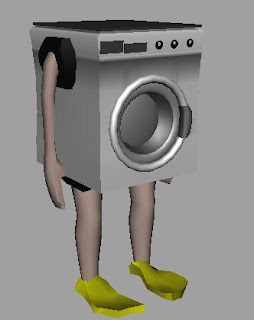
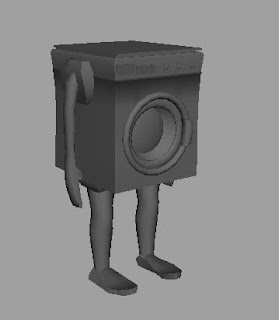


I am fairly pleased with the way this model turned out, as it was my first ever time modelling a character. I went on to texture the character to look as much like a washing machine as i could, and gave him human coloured arms and legs.


Rigging

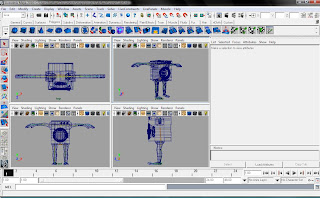
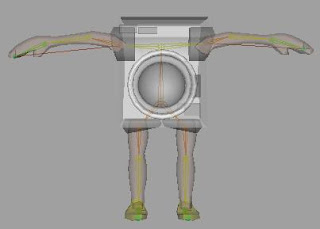
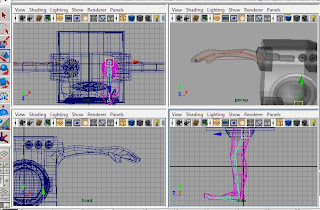
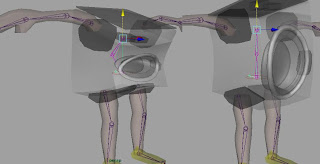
I went on to try to rig my character, however this gave me some problems, after asking many times for help, i couldnt use the tutorial i was given to any effect to try to get the movement i wanted in my charater. As i have had no previous rigging experience, and didnt have much time to learn, due to other commitments in other projects, i felt like i neglected this project somewhat and maybe in the future i will learn how to rig so i do not come across this problem again.
I did my best in trying to create a skeleton inside my washing machine and i got some of the desired effects i wanted. I got the arms and Legs working well on IK handles, and i got a nice bend in the torso area of the washing machine, but when it came to actually animating the character, it wouldnt move as i wanted, and it was the fine turning that i needed help with and didnt really know where to get it as whenever i asked i was told to look at tutorials, which only told me what i already knew. Some of the pictures below show the movement i was able to get out of the rig and the way that i built it. I am fairly certain that i am capiable of expanding my knowledge of rigging in the future, although i do not enjoy it one bit. However i feel it is a nescessary part of the animation course.
Storyboard


This is the storyboard for my proposed scene. The green character is my 3D aspect, the blue is Hurley and the yellow are random bystanders. The scene tracks across the beach so the idea is to have to character in 3d being tracked with the camera, so he wont nescessarily move in a forward direction, but will instead be tracked with the camera movement giving the illusion that he is standing and walking on the spot if you was to take away the live action sequence. The camera follows the character and as he approaches the end of the Rock in the foreground he quickly turns his head to face the camera, and then back around 180 degrees to fadce Hurley, and then raises an arm to wave to him, and then walks off. I feel that this scene will work well and will enable me to have some good interaction animation between the live action character and my own character. The plan is to keep the washing machine character i have designed with intention in using in my earlier chosen scene as he will fit in with the debris on the beach and will look rather funny walking along while he should be a part of the debris.

Problems with first scene

The first scene i chose, was one which included a very fast paced camera track, through a well built up jungle. The original idea was to have a washingmachine chase the characters within the scene in a threatening way, however once i had broken down my scene into image files, and imported them into MayaLive, i found out that the tracking quality was poor, and that the background did not have any real focus to track. The camera track was good quality in some places, however my tracking points kept fading into the background so the amount of track that i got was very small compared to what i was hoping for. This spurred me on to find a new scene, with a slower camera track which i could follow, and my priority was to get things in my scene to focuz my tracking points on.
I went back to my starting point of Pilot episode 1 of Lost, and found a more simplistic shot of a tracking shot across the beach with lots of debris in the foreground which allowed me to easily track points from. The scene had Hurley enter the scene about mideway through and sit down, which allowed for any character that i put in to have to potential to interact with Hurley.

Schedule

Brief

Iset out with the task of creating a piece of animation which worked in a realistic Live Action environment. Since we had already done this the term before, i started asking myself what i could do to expand what i had already learnt, and soon i becan to understand that it was more to do with learning new pieces of kit which could help in some live action-animation situations, for example MayA Live. I knew now that i needed to track a piece of footage ready to place an animated character to interact with the scene. This got me thinking of what sort of scene i would like to do...

A chase scene stuck out immediately, so i went on to reseach chase scenes, and car chases came to mind, but i knew that in car chase scenes there were many fast cutting scenes all clipped together and i thought it would be very hard to encorporate any 3d character into that sort of scene with any real justification. I then started thinking about different types of chase scenes, and tracking scenes from LOST came to mind. I enjoy the programme LOST and in particular i enjoy the long tracking scenes they use to build suspense in showing that something is chasing the characters during the scene without ever actually seeing what is chasing them, and this seemed like the ideal opportunity for me. I looked through the Pilot episode of Lost Series 1 and found a fantastic tracking shot of Kate, Jack and Charlie being chased through the jungle by a seemingly invisible creature. I intended to use this scene and then progressed with storyboarding the see when and what i would like to add as my 3D aspect of the scene.